Enterprise Gateway
The CygNet Enterprise Gateway is a web service that can be used to pass through requests and responses to Enterprise Operations (EntOps) devices. Alternatively, requests and responses can be passed through SonicMQ or Sonic ESB, or directly through the Enterprise Operations EIE file system via custom applications.
As each request is received by the Enterprise Gateway, it is validated against the appropriate XSD (XML Schema Definition) and valid requests are placed in the Enterprise Operations device’s Input Requests folder on the file system. If an invalid request is received, an immediate response will be sent with an appropriate error message.
|
Click the thumbnail to see an |
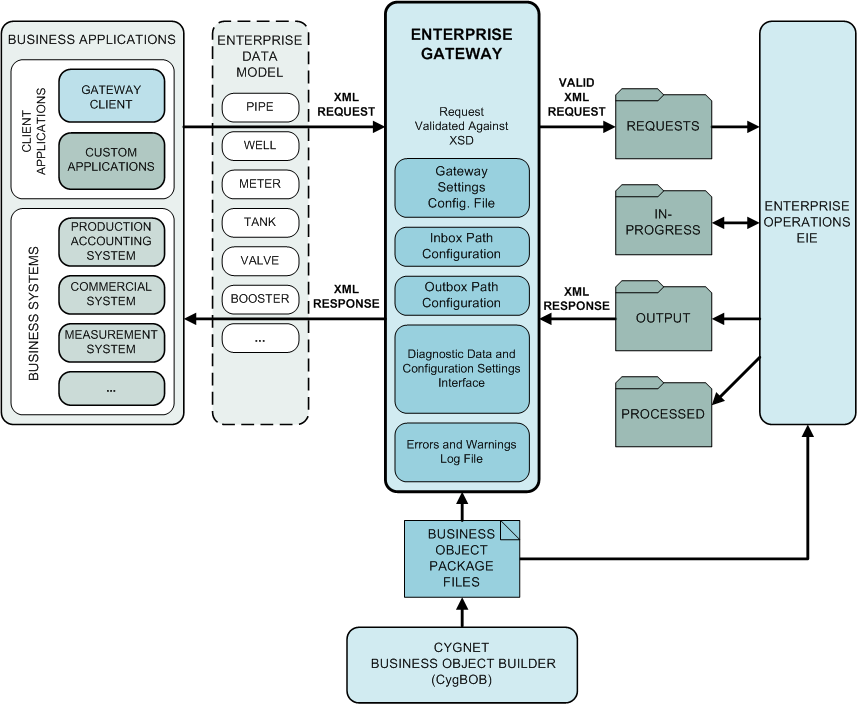
The Enterprise Gateway maintains a log file of errors and warnings, as well as an exposed WCF interface for user query of diagnostic data and configuration settings such as inbox/outbox paths, service version, ARS address, etc. In order for the Enterprise Gateway to run, the configuration file (GatewaySettings.xml) must exist and the inbox and outbox paths are required. The service will not start if these items are missing.
Enterprise Gateway Considerations
Prior to Enterprise Gateway installation and configuration, consider the following.
- The Enterprise Gateway is a service, therefore only one instance of the Enterprise Gateway can be installed on a machine.
- It is highly recommended that the Enterprise Gateway be installed on the server that hosts the CygNet SCADA services. While remote installations are supported, performance will be hampered by network latency.
- Each Enterprise Operations device instance must be configured to use the same Input Requests and Output Responses folders, in order to allow the Enterprise Gateway to process requests from multiple Enterprise Operations device instances.
More:
 Installation and Configuration


